
How do you make sure documents generated by systems — likely most documents out there today — are accessible to users and comply with accessibility legislation? Let’s geek out on that topic in this article!
What’s the problem?
When learning about accessible documents, almost all guidance focuses on manually created files: how to tag a PDF by hand, how to export a Word document correctly and so on.
But think about the last few documents you received that were personalised for you. Maybe a:
- loan commitment from your bank
- salary statement
- tax information
- digital receipt
These documents are almost always generated by systems.
If they come from an organisation covered by accessibility legislation (public sector, banks, e-commerce, etc.), documents must be accessible — regardless of how they’re produced.
In practice, making the document accessible includes ensuring that:
- the document is properly tagged
- headings, tables, lists and so on are marked up correctly
- images have alt-text that describe them
- color contrast of text and important graphical elements is sufficient
In short: assistive technologies like screen readers must be able to understand the structure and content.
Example: an inaccessible system generated document
Here’s a classic example of an untagged document. The Accessibility tags pane, which I’ve opened in Adobe Acrobat Pro, shows “No Tags available”:
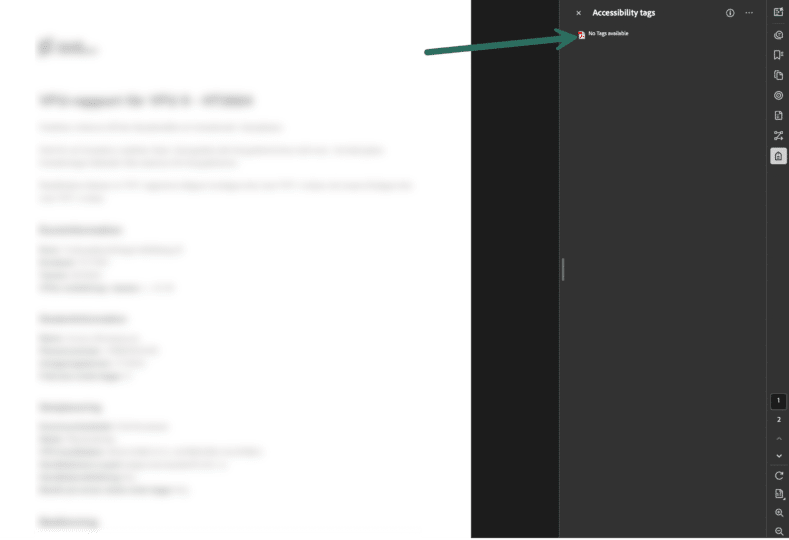
Without tags, assistive technology like screen readers can’t interpret the content in a meaningful way. Many visually impaired users navigate documents by jumping between headings — something that’s simply impossible when headings aren’t tagged.
Example: an accessible system-generated document
Now here’s an accessible one.
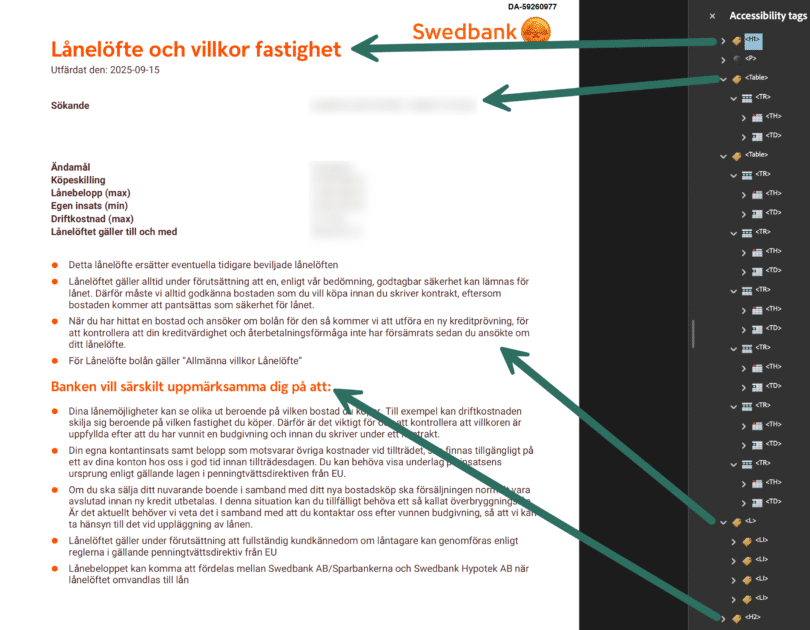
Notice the tag tree contains meaningful structure:
- <H1>, <H2> and so on for headings
- <P> for paragraphs
- <Table>, <TH>, <TD> for tables (TH and TD stand for table header and table data)
- <L> and <LI> for lists (List and List Item)
This structure is core in making the document accessible and usable for assistive technology users.
Figure out how accessible your system generated documents are
If you have Adobe Acrobat Pro, this is fairly easy:
- Open the Accessibility Tags panel
- Run Adobe’s Accessibility Checker
You’ll quickly get a high-level view of what’s working and what’s not.
No Acrobat Pro? Reach out and we’ll help you with an initial assessment: contact@enit.se
Three ways to approach the challenge
There are three common strategies for improving accessibility in system-generated documents, and which one you chose will likely depend on the current state of your organisation.
- System upgrade or migration – we can call this “Accessibility by design”.
- Accessibility add-ons – “Accessibility by remediation”
- Change to HTML (with PDF as alternative) – “Accessibility by default”
Let’s go through them one by one!
1. System upgrade or migration – “Accessibility by design”
This is the most robust—but also the most time-consuming—approach to achieving accessibility in system-generated documents.
Pros:
- One-off implementation effort
- Long-term, maintainable solution
- <span”>Supports all aspects of accessibility, not only technical compliance
Cons:
- Can be time-consuming and complex
- May require a new installation
- Does not address historical documents
Most system generated documents are produced using a Customer Communication Management (CCM) system. The three major CCM providers are OpenText, Quadient and Smart Communications.
All three offer platforms that support accessible PDF generation, including:
- OpenText Communications
- Quadient Inspire Flex
- Quadient Inspire Evolve
- Smart Communications SmartCOMM
Accessibility support in these platforms has matured significantly in recent years. When running on the latest released versions, all three vendors provide strong support for accessible PDF output.
Introducing accessibility through a system upgrade requires all document templates to be reviewed and updated with correct semantic structure and tagging. This includes proper handling of headings, tables, images, lists and other artefacts that affect the user experience for users of assistive technologies like screen readers.
The organisation must decide on the migration strategy—whether to perform a 1:1 migration or to rationalise templates. We generally recommends starting with template rationalisation workshops to reduce scope and identify synergies. This approach has proven effective in shortening time to market while also future-proofing the CCM setup.
A system upgrade supports accessibility by design for all new documents. It also allows organisations to address not only technical compliance, but also qualitative aspects such as clearer language, improved typography, and better contrast—resulting in a more inclusive user experience. In many cases, this is also a suitable opportunity to review the CCM solution as a whole.
However, if the accessibility initiative is subject to tight deadlines, this approach may be challenging due to implementation time and, depending on the selected platform, higher costs.
2. Accessibility Add-Ons – “Accessibility by Remediation”
With this approach, accessibility features such as tagging and reading order are added after the PDF has been generated. The visual layout and content of the PDF remain unchanged, although content updates can of course be handled separately if required.
Pros:
- Short time to market
- Source-agnostic (depending on licence model)
- Can support historical documents
Cons:
- Increased complexity due to dual code bases (CCM + remediation)
- Primarily addresses technical accessibility
Post-composition remediation is a fast and effective way to create value early in an accessibility initiative. Both OpenText and Quadient provide remediation tools:
- OpenText Accessibility Add-On
- Quadient Inspire Adapt
If the technical prerequisites are met—such as a suitable CCM project setup or compatible source systems—the remediation work can be divided into multiple parallel streams. This makes the approach well suited for projects with tight deadlines.
The primary advantages are speed and flexibility. The approach can be largely source-agnostic, and depending on the licensing model, it may also support both new and historical documents. Implementation is typically straightforward.
However, remediation introduces two separate code bases: one for document generation and one for PDF remediation. This requires disciplined governance, controlled change management, and a robust testing framework to ensure both layers remain aligned over time.
3. Change to HTML (with PDF as alternative)
Delivering content in HTML format often results in significantly higher accessibility. HTML is inherently well suited for assistive technologies, offering strong support for semantic structure, responsiveness, navigation and user-controlled presentation. For many use cases, HTML can therefore serve as the primary delivery format, while PDF is retained as a backup or archival version.
Pros
- Higher level of accessibility can be achieved
- Low software and tooling costs
- PDF can be retained as complement or for legal, audit and archival purposes
Cons
- Not suitable as a replacement for PDFs in all legal contexts
- Requires investigative and modelling work
- Potential double maintenance (HTML delivery and PDF generation)
In digital inboxes, users typically interact with transactional information through an HTML-based view optimised for accessibility and usability, while still having the option to download the corresponding PDF for reference or storage when needed.
A HTML-based letter in digital inboxes will be easy to read with assistive technologies, text is usually resizable among other benefits.
This approach shifts the focus from making PDFs accessible to ensuring that users receive information in a format that is accessible by default. The PDF is still generated and stored where required—for example, for legal compliance, auditing, or long-term archiving—but it is no longer the primary interface for the end user.
When does an HTML-first approach make sense?
From a CCM perspective, this approach is particularly relevant when:
- A full system upgrade is not immediately feasible
- Accessibility legislation, such as the European Accessibility Act (EAA), must still be met
- Documents are primarily informational rather than legally binding
In these situations, organisations can deliver content in HTML while keeping the PDF as a complementary, secondary or fallback format. This enables progress toward accessibility compliance without delaying longer-term CCM modernisation initiatives.
An HTML-first approach also allows improvements to language clarity, structure, typography, and contrast—similar to what is possible in a fully upgraded CCM environment. Some investigative and modelling work may be required to extract or re-structure document logic, particularly for older templates, but this approach often provides a pragmatic and scalable path to accessibility.
Where to Start?
Begin by identifying which approach—or combination of approaches—best fits your organisation’s document landscape, timelines, and regulatory obligations.
Book a meeting with Axess Lab and Enit, and we will help you assess your current situation and define the most effective path forward: contact@enit.se
This article is a collaboration with Axess Lab
It was written by Lisa Huge, ENIT, and Hampus Sethfors, Axess Lab, for a webinar held together ENIT and Axess Lab.
Here is a link to the recorded webinar.
Here is a link to how ENIT can help you with accessibility ENIT Accessibility LAB